Coding Worksheets for Kids
- Free PDFs, no signup
- 42 printables
- US Letter and A4
- Complete pack: all 42 pages in one PDF
- Updated November 2026
Free printable coding worksheets for kids from preschool to 2nd grade: unplugged, screen-free coding with arrows on a grid.
By signing up you agree to our privacy policy and to occasional emails with new printables. Unsubscribe any time.
Thank you! Your PDF is downloading. If it did not start, tap here to download it.
More direction practice: arrow drawings and positional words ↓


More direction practice: arrow drawings and positional words


About these printables
A character (a pig, a bunny, a bee, a puppy, a reindeer and more) has to reach its goal, things in the way block some squares, and the child writes the code one arrow per square. There are 42 printables here with 50 coding boards, every one with an answer key on page 2, in US Letter size that also prints on A4.
Four kinds of sheets build the skills in order. Write the code: draw the arrows that take the character to its goal. Follow the code: read a given code, draw the path and circle where the character stops. Find the bug: one arrow in the code is wrong, so kids circle it and fix it. Coding with loops: in 2nd grade a block like right x3 replaces three arrows, and the sheet limits how many blocks kids may use.
Preschool sheets have two small boards with straight paths or one turn. Kindergarten boards are 5 by 5 with obstacles to go around. 1st grade boards are 6 by 6 with two treats to collect before the goal, and 2nd grade boards are 7 by 7 with repeat blocks. Every board is also a level of our free online coding game, and each sheet page links to it, so kids can print a puzzle and then check it on the screen (or the other way round).
For floor and table coding there is a page of arrow cards to cut out (with x2, x3 and x4 repeat cards) and a blank game board with 56 cut-out pictures, so kids can build puzzles for each other. Teachers use the set for the Hour of Code in Computer Science Education Week in December, or as a coding center any time of the year.
At a glance
- Pages
- 42 free printables, one PDF each
- Ages
- 3 to 8
- Levels
- Pre-K to Grade 2
- Answer keys
- 40 of the 42 pages have one on page 2
- Paper
- US Letter and A4
- Play online
- 40 of them also work as a free browser game
- Complete pack
- all 42 pages in one PDF (box at the top of this page)
- Price
- free; every single page downloads with no sign-up
All 42 Coding Worksheets for Kids, One by One
Here is a closer look at every page in this collection, with who it's best for and a coloring idea for each one.
-
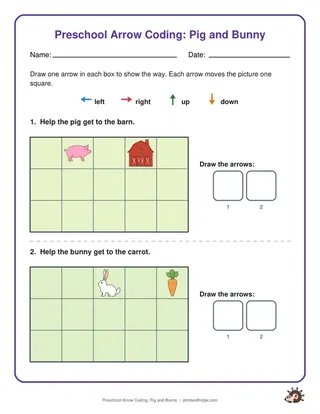
1. Preschool Arrow Coding: Pig and Bunny
Each half of the page has a 3 by 5 grid and a row of empty boxes: two boxes for the pig, two for the bunny. Both walks are straight lines, so the pig and the bunny each need one direction, repeated. The arrow key above the boards names left, right, up and down, so a grown-up can read the pig and bunny puzzles aloud. Page 2 shows the pig's and the bunny's arrows in red with the path shaded. Both boards are also levels of our free online coding game: "Pig to the Barn: First Steps" and "Bunny to the Carrot: First Steps".
-
2. Preschool Arrow Coding: Bee and Mouse
Each half of the page has a 3 by 5 grid and a row of empty boxes: three boxes for the bee, three for the mouse. Both walks are straight lines, so the bee and the mouse each need one direction, repeated. The arrow key above the boards names left, right, up and down, so a grown-up can read the bee and mouse puzzles aloud. Page 2 shows the bee's and the mouse's arrows in red with the path shaded. Both boards are also levels of our free online coding game: "Bee to the Hive: First Steps" and "Mouse to the Cheese: First Steps".
-
3. Preschool Arrow Coding: Fish and Penguin
Each half of the page has a 3 by 5 grid and a row of empty boxes: three boxes for the fish, two for the penguin. Both walks are straight lines, so the fish and the penguin each need one direction, repeated. The arrow key above the boards names left, right, up and down, so a grown-up can read the fish and penguin puzzles aloud. Page 2 shows the fish's and the penguin's arrows in red with the path shaded. Both boards are also levels of our free online coding game: "Fish to the Shell: First Steps" and "Penguin to the Igloo: First Steps".
-
4. Follow the Arrows for Preschool: Puppy and Car
The puppy board comes with a code of three arrow cards and the car board with one. The child moves a finger one square per arrow, circles the square where the picture stops and circles yes or no: did the car get there, and the puppy? One of the two codes is a little off, so the car stops short of the house, and only careful counting shows it. The key shades the puppy and car paths and rings the stopping squares. Both boards are also levels of our free online coding game: "Puppy to the Bone: First Steps" and "Car to the House: First Steps".
-
5. Follow the Arrows for Preschool: Astronaut and Reindeer
The astronaut board comes with a code of two arrow cards and the reindeer board with four. The child moves a finger one square per arrow, circles the square where the picture stops and circles yes or no: did the reindeer get there, and the astronaut? One of the two codes is a little off, so the astronaut stops short of the rocket, and only careful counting shows it. The key shades the astronaut and reindeer paths and rings the stopping squares. Both boards are also levels of our free online coding game: "Astronaut to the Rocket: First Steps" and "Reindeer to the Sleigh: First Steps".
-
6. Follow the Code for Preschool: Pig and Bunny Turn
The pig board comes with a code of three arrow cards and the bunny board with three. The child moves a finger one square per arrow, circles the square where the picture stops and circles yes or no: did the bunny get there, and the pig? One of the two codes is a little off, so the bunny stops short of the carrot, and only careful counting shows it. The key shades the pig and bunny paths and rings the stopping squares. Both boards are also levels of our free online coding game: "Pig to the Barn: Turn the Corner" and "Bunny to the Carrot: Turn the Corner".
-
7. Follow the Code for Preschool: Bee and Mouse Turn
The bee board comes with a code of two arrow cards and the mouse board with four. The child moves a finger one square per arrow, circles the square where the picture stops and circles yes or no: did the mouse get there, and the bee? One of the two codes is a little off, so the bee stops short of the hive, and only careful counting shows it. The key shades the bee and mouse paths and rings the stopping squares. Both boards are also levels of our free online coding game: "Bee to the Hive: Turn the Corner" and "Mouse to the Cheese: Turn the Corner".
-
8. Preschool Coding, Turn the Corner: Fish and Penguin
Each board is a 4 by 4 grid where the path bends once, so the code has two directions: five boxes for the fish and three for the penguin. Turning a corner is the step after straight lines, and the empty boxes tell the child how many arrows the fish needs. Going across first and then up or down (or the other way round) can both work, and the key says that any 5-arrow code that reaches the shell is right. Both boards are also levels of our free online coding game: "Fish to the Shell: Turn the Corner" and "Penguin to the Igloo: Turn the Corner".
-
9. Preschool Coding, Turn the Corner: Puppy and Car
Each board is a 4 by 4 grid where the path bends once, so the code has two directions: three boxes for the puppy and four for the car. Turning a corner is the step after straight lines, and the empty boxes tell the child how many arrows the puppy needs. Going across first and then up or down (or the other way round) can both work, and the key says that any 3-arrow code that reaches the bone is right. Both boards are also levels of our free online coding game: "Puppy to the Bone: Turn the Corner" and "Car to the House: Turn the Corner".
-
10. Preschool Coding, Turn the Corner: Astronaut and Reindeer
Each board is a 4 by 4 grid where the path bends once, so the code has two directions: five boxes for the astronaut and three for the reindeer. Turning a corner is the step after straight lines, and the empty boxes tell the child how many arrows the astronaut needs. Going across first and then up or down (or the other way round) can both work, and the key says that any 5-arrow code that reaches the rocket is right. Both boards are also levels of our free online coding game: "Astronaut to the Rocket: Turn the Corner" and "Reindeer to the Sleigh: Turn the Corner".
-
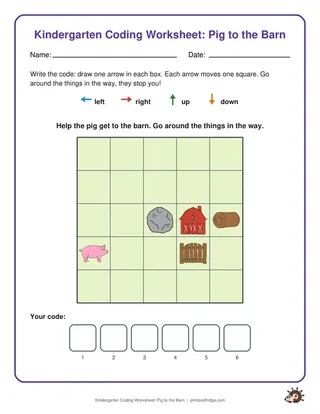
11. Kindergarten Coding Worksheet: Pig to the Barn
The 5 by 5 grid shows the pig and the barn, with a rock, a log and a fence in the way and six empty boxes under it. Kids plan the route first, then draw one arrow per box; an arrow that walks into a square with something on it stops the pig, so going around is the puzzle. Page 2 has the shortest code for the pig in red and the path shaded, and notes that other codes of the same length work too. This board is also the level "Pig to the Barn: Go Around" in our free online coding game.
-
12. Kindergarten Coding Worksheet: Bunny to the Carrot
The 5 by 5 grid shows the bunny and the carrot, with two rocks, a tree and a mushroom in the way and seven empty boxes under it. Kids plan the route first, then draw one arrow per box; an arrow that walks into a square with something on it stops the bunny, so going around is the puzzle. Page 2 has the shortest code for the bunny in red and the path shaded, and notes that other codes of the same length work too. This board is also the level "Bunny to the Carrot: Go Around" in our free online coding game.
-
13. Follow the Code: Bee Goes Around to the Hive
Kids read the six printed arrows one by one, draw the bee's path on the grid and circle the square where it stops, then circle yes or no: did it reach the hive? Reading code someone else wrote is the other half of coding, and the bee puzzle also trains left and right. On the answer key the bee's path is shaded and the stopping square has a red ring. This board is also the level "Bee to the Hive: Go Around" in our free online coding game.
-
14. Kindergarten Coding Worksheet: Mouse to the Cheese
The 5 by 5 grid shows the mouse and the cheese, with two cats, two chairs and a broom in the way and seven empty boxes under it. Kids plan the route first, then draw one arrow per box; an arrow that walks into a square with something on it stops the mouse, so going around is the puzzle. Page 2 has the shortest code for the mouse in red and the path shaded, and notes that other codes of the same length work too. This board is also the level "Mouse to the Cheese: Go Around" in our free online coding game.
-
15. Follow the Code: Fish Goes Around to the Shell
Kids read the five printed arrows one by one, draw the fish's path on the grid and circle the square where it stops, then circle yes or no: did it reach the shell? Reading code someone else wrote is the other half of coding, and the fish puzzle also trains left and right. On the answer key the fish's path is shaded and the stopping square has a red ring. This board is also the level "Fish to the Shell: Go Around" in our free online coding game.
-
16. Kindergarten Coding Worksheet: Penguin to the Igloo
The 5 by 5 grid shows the penguin and the igloo, with two snowmen, two rocks and a tree in the way and six empty boxes under it. Kids plan the route first, then draw one arrow per box; an arrow that walks into a square with something on it stops the penguin, so going around is the puzzle. Page 2 has the shortest code for the penguin in red and the path shaded, and notes that other codes of the same length work too. This board is also the level "Penguin to the Igloo: Go Around" in our free online coding game.
-
17. Kindergarten Coding Worksheet: Puppy to the Bone
The 5 by 5 grid shows the puppy and the bone, with two benches, two trees and a bike in the way and six empty boxes under it. Kids plan the route first, then draw one arrow per box; an arrow that walks into a square with something on it stops the puppy, so going around is the puzzle. Page 2 has the shortest code for the puppy in red and the path shaded, and notes that other codes of the same length work too. This board is also the level "Puppy to the Bone: Go Around" in our free online coding game.
-
18. Follow the Code: Car Goes Around to the House
Kids read the six printed arrows one by one, draw the car's path on the grid and circle the square where it stops, then circle yes or no: did it reach the house? Reading code someone else wrote is the other half of coding, and the car puzzle also trains left and right. On the answer key the car's path is shaded and the stopping square has a red ring. This board is also the level "Car to the House: Go Around" in our free online coding game.
-
19. Kindergarten Coding Worksheet: Astronaut to the Rocket
The 5 by 5 grid shows the astronaut and the rocket, with two UFOs, a space rock and an alien in the way and seven empty boxes under it. Kids plan the route first, then draw one arrow per box; an arrow that walks into a square with something on it stops the astronaut, so going around is the puzzle. Page 2 has the shortest code for the astronaut in red and the path shaded, and notes that other codes of the same length work too. This board is also the level "Astronaut to the Rocket: Go Around" in our free online coding game.
-
20. Follow the Code: Reindeer Goes Around to the Sleigh
Kids read the six printed arrows one by one, draw the reindeer's path on the grid and circle the square where it stops, then circle yes or no: did it reach the sleigh? Reading code someone else wrote is the other half of coding, and the reindeer puzzle also trains left and right. On the answer key the reindeer's path is shaded and the stopping square has a red ring. This board is also the level "Reindeer to the Sleigh: Go Around" in our free online coding game.
-
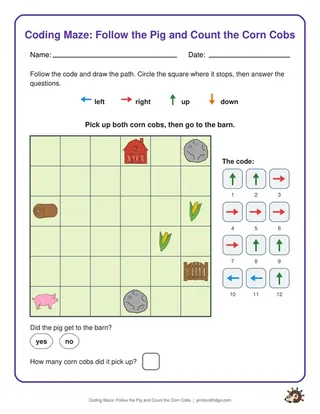
21. Coding Maze: Follow the Pig and Count the Corn Cobs
The 6 by 6 board has the pig, two corn cobs and the barn, plus two rocks, a log and a fence in the way. Kids follow the printed code of 12 arrows, draw the path, circle the square where it ends, say whether the pig got to the barn and write how many corn cobs it collected. Farm animals make the board friendly for little coders. The key shows the pig's path, the end square and both answers. This board is also the level "Pig Collects Corn Cobs" in our free online coding game.
-
22. Grid Coding Worksheet: Bunny Collects Strawberries
A first grade coding puzzle with an order to it: the bunny visits both strawberries before it may stop at the carrot, while two rocks, a tree and a mushroom block some squares. There are 13 empty boxes, exactly the length of the shortest code, so a detour on the way to the carrot runs out of boxes. A yes or no line asks the child to test the bunny's code with a coin. A garden board with a hungry bunny. Page 2 gives one shortest code for the bunny in red with the path shaded, and other codes of the same length are also correct. This board is also the level "Bunny Collects Strawberries" in our free online coding game.
-
23. Debugging Worksheet: Fix the Code for the Bee
A debugging worksheet for 1st grade on a 6 by 6 board with two flowers to collect and two spiders, two spider webs and a rain cloud in the way. The printed code for the bee is right except for a single arrow; following it square by square shows where things go wrong. Kids circle the wrong arrow in the bee's code, write its step number, draw the arrow that fixes it and circle what went wrong. Our program checked that only one change fixes the bee's code. A sunny meadow where the bee heads home. This board is also the level "Bee Collects Flowers" in our free online coding game.
-
24. Debugging Worksheet: Fix the Code for the Mouse
A debugging worksheet for 1st grade on a 6 by 6 board with two cookies to collect and two cats, a chair and a broom in the way. The printed code for the mouse is right except for a single arrow; following it square by square shows where things go wrong. Kids circle the wrong arrow in the mouse's code, write its step number, draw the arrow that fixes it and circle what went wrong. Our program checked that only one change fixes the mouse's code. A board set inside the house, where the mouse sneaks toward the cheese. This board is also the level "Mouse Collects Cookies" in our free online coding game.
-
25. Grid Coding Worksheet: Fish Collects Starfish
A first grade coding puzzle with an order to it: the fish visits both starfish before it may stop at the shell, while two octopuses, a jellyfish and a crab block some squares. There are 12 empty boxes, exactly the length of the shortest code, so a detour on the way to the shell runs out of boxes. A yes or no line asks the child to test the fish's code with a coin. An underwater board where the fish swims to its shell. Page 2 gives one shortest code for the fish in red with the path shaded, and other codes of the same length are also correct. This board is also the level "Fish Collects Starfish" in our free online coding game.
-
26. Coding Maze: Follow the Penguin and Count the Fish
The 6 by 6 board has the penguin, two fish and the igloo, plus two snowmen, two rocks and a tree in the way. Kids follow the printed code of 13 arrows, draw the path, circle the square where it ends, say whether the penguin got to the igloo and write how many fish it collected. A snowy board for winter weeks. The key shows the penguin's path, the end square and both answers. This board is also the level "Penguin Collects Fish" in our free online coding game.
-
27. Grid Coding Worksheet: Puppy Collects Balls
A first grade coding puzzle with an order to it: the puppy visits both balls before it may stop at the bone, while two benches, a tree and a bike block some squares. There are 9 empty boxes, exactly the length of the shortest code, so a detour on the way to the bone runs out of boxes. A yes or no line asks the child to test the puppy's code with a coin. A park board where the puppy goes after its bone. Page 2 gives one shortest code for the puppy in red with the path shaded, and other codes of the same length are also correct. This board is also the level "Puppy Collects Balls" in our free online coding game.
-
28. Debugging Worksheet: Fix the Code for the Car
A debugging worksheet for 1st grade on a 6 by 6 board with two packages to collect and two trucks, two buses and two traffic cones in the way. The printed code for the car is right except for a single arrow; following it square by square shows where things go wrong. Kids circle the wrong arrow in the car's code, write its step number, draw the arrow that fixes it and circle what went wrong. Our program checked that only one change fixes the car's code. A city board where the little car drives home. This board is also the level "Car Collects Packages" in our free online coding game.
-
29. Coding Maze: Follow the Astronaut and Count the Stars
The 6 by 6 board has the astronaut, two stars and the rocket, plus two UFOs, a space rock and an alien in the way. Kids follow the printed code of 12 arrows, draw the path, circle the square where it ends, say whether the astronaut got to the rocket and write how many stars it collected. A space board for kids who love rockets. The key shows the astronaut's path, the end square and both answers. This board is also the level "Astronaut Collects Stars" in our free online coding game.
-
30. Grid Coding Worksheet: Reindeer Collects Gifts
A first grade coding puzzle with an order to it: the reindeer visits both gifts before it may stop at the sleigh, while two Christmas trees, two snowmen and a gingerbread man block some squares. There are 9 empty boxes, exactly the length of the shortest code, so a detour on the way to the sleigh runs out of boxes. A yes or no line asks the child to test the reindeer's code with a coin. A North Pole board for the weeks before Christmas. Page 2 gives one shortest code for the reindeer in red with the path shaded, and other codes of the same length are also correct. This board is also the level "Reindeer Collects Gifts" in our free online coding game.
-
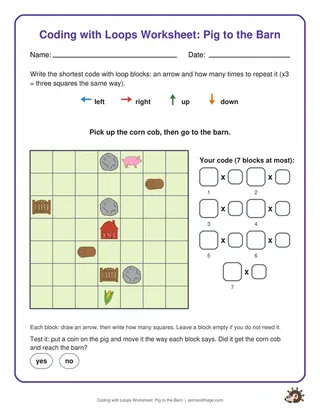
31. Coding with Loops Worksheet: Pig to the Barn
A 7 by 7 grid with the pig, one corn cob to collect and the barn, with three rocks, two logs and two fences in the way. Each block for the pig has an arrow box and a number box: right x3 means three squares to the right. The pig's walk is 16 squares long but fits in 6 blocks, and the sheet gives 7, so kids learn to spot runs of the same arrow. A test line asks them to run the pig's code with a coin. Page 2 shows a shortest code for the pig in blocks. This board is also the level "Pig to the Barn: Loops" in our free online coding game.
-
32. Debug the Loop Code: Bunny to the Carrot
A 2nd grade debugging page on a 7 by 7 board with a strawberry to collect and two rocks, two trees and two mushrooms. The bunny's code is written in loop blocks and exactly one block is wrong, its arrow or its repeat number. Kids follow the bunny's blocks square by square, circle the wrong one, write the right block and say what went wrong. Our program checked that a single change is the only fix for the bunny. The key marks the bunny's bug and draws the working path. This board is also the level "Bunny to the Carrot: Loops" in our free online coding game.
-
33. Follow the Loop Code: Bee in the Meadow
The code is printed as four blocks, each an arrow with a number, on a 7 by 7 board with a flower, the hive and two spiders, two spider webs and two rain clouds. Kids unroll each block into squares, draw the bee's path, circle the square where it stops and answer whether it reached the hive. The key shades the bee's path and rings the end square. This board is also the level "Bee to the Hive: Loops" in our free online coding game.
-
34. Coding with Loops Worksheet: Mouse to the Cheese
A 7 by 7 grid with the mouse, one cookie to collect and the cheese, with three cats, two chairs and two brooms in the way. Each block for the mouse has an arrow box and a number box: right x3 means three squares to the right. The mouse's walk is 13 squares long but fits in 5 blocks, and the sheet gives 6, so kids learn to spot runs of the same arrow. A test line asks them to run the mouse's code with a coin. Page 2 shows a shortest code for the mouse in blocks. This board is also the level "Mouse to the Cheese: Loops" in our free online coding game.
-
35. Debug the Loop Code: Fish to the Shell
A 2nd grade debugging page on a 7 by 7 board with a starfish to collect and three octopuses, two jellyfish and two crabs. The fish's code is written in loop blocks and exactly one block is wrong, its arrow or its repeat number. Kids follow the fish's blocks square by square, circle the wrong one, write the right block and say what went wrong. Our program checked that a single change is the only fix for the fish. The key marks the fish's bug and draws the working path. This board is also the level "Fish to the Shell: Loops" in our free online coding game.
-
36. Follow the Loop Code: Penguin in the Snow
The code is printed as four blocks, each an arrow with a number, on a 7 by 7 board with a fish, the igloo and two snowmen, two rocks and two trees. Kids unroll each block into squares, draw the penguin's path, circle the square where it stops and answer whether it reached the igloo. The key shades the penguin's path and rings the end square. This board is also the level "Penguin to the Igloo: Loops" in our free online coding game.
-
37. Debug the Loop Code: Puppy to the Bone
A 2nd grade debugging page on a 7 by 7 board with a ball to collect and two benches, two trees and a bike. The puppy's code is written in loop blocks and exactly one block is wrong, its arrow or its repeat number. Kids follow the puppy's blocks square by square, circle the wrong one, write the right block and say what went wrong. Our program checked that a single change is the only fix for the puppy. The key marks the puppy's bug and draws the working path. This board is also the level "Puppy to the Bone: Loops" in our free online coding game.
-
38. Coding with Loops Worksheet: Car to the House
A 7 by 7 grid with the car, one package to collect and the house, with three trucks, three buses and two traffic cones in the way. Each block for the car has an arrow box and a number box: right x3 means three squares to the right. The car's walk is 18 squares long but fits in 6 blocks, and the sheet gives 7, so kids learn to spot runs of the same arrow. A test line asks them to run the car's code with a coin. Page 2 shows a shortest code for the car in blocks. This board is also the level "Car to the House: Loops" in our free online coding game.
-
39. Follow the Loop Code: Astronaut in Space
The code is printed as four blocks, each an arrow with a number, on a 7 by 7 board with a star, the rocket and three UFOs, three space rocks and two aliens. Kids unroll each block into squares, draw the astronaut's path, circle the square where it stops and answer whether it reached the rocket. The key shades the astronaut's path and rings the end square. This board is also the level "Astronaut to the Rocket: Loops" in our free online coding game.
-
40. Coding with Loops Worksheet: Reindeer to the Sleigh
A 7 by 7 grid with the reindeer, one gift to collect and the sleigh, with three Christmas trees, three snowmen and two gingerbread men in the way. Each block for the reindeer has an arrow box and a number box: right x3 means three squares to the right. The reindeer's walk is 13 squares long but fits in 6 blocks, and the sheet gives 7, so kids learn to spot runs of the same arrow. A test line asks them to run the reindeer's code with a coin. Page 2 shows a shortest code for the reindeer in blocks. This board is also the level "Reindeer to the Sleigh: Loops" in our free online coding game.
-
41. Unplugged Coding Arrow Cards to Cut Out
One page of big cards in a 6 by 5 grid with real dashed cut lines: six right arrows, six left, six up and six down, each with its word under it, and a bottom row of repeat cards (two each of x2, x3 and x4). Kids lay the arrows in a row to write a program, then move a toy across floor tiles, a rug pattern or the printable game board, one square per card. The repeat cards turn three right arrows into one right arrow and an x3 card, which is the first idea of a loop. Print on card stock if you can, or glue the sheet to a cereal box before cutting.
-
42. Unplugged Coding Game Board with Cut-Out Pictures
Page 1 is a big 6 by 6 grid (each square a little under an inch, the size of the cut-out pictures) with four short rules for playing. Page 2 holds 56 pictures from our coding worksheets to cut out: the pig, the bunny, the bee, the mouse, the fish, the penguin, the puppy, the car, the astronaut and the reindeer, their goals (barn, carrot, hive, cheese, shell, igloo, bone, house, rocket and sleigh), treats to collect and things that block the way. One player sets up a puzzle, the other writes the code with the arrow cards or with a pencil. It works for two kids, for a parent and a preschooler, or for a whole table in class.
Tips for using coding worksheets
- Say each arrow out loud while moving: "right, right, up". Talking through the code catches most mistakes.
- Let kids test their own code with a coin or a small toy before checking the answer key.
- When a code fails, do not erase it all: find the first wrong step and fix only that one, like a programmer.
- Start with the follow-the-code sheets if writing arrows is hard; reading code comes before writing it.
Did you know?
- Computer scientists call a mistake in code a bug, and finding it is called debugging.
- A loop tells a computer to repeat something, so a program can be much shorter than the steps it runs.
- Many classroom robot toys for young kids are programmed with the same four arrows used on these sheets.
Fun ways to use your printables
- Tape a grid on the floor and let your child be the robot while a sibling reads the arrow cards.
- Ask your child to write a code for you to walk from the couch to the fridge.
- After a sheet, play the same board in the online game and compare the codes.
How to print
Click Download PDF and print at 100% on US Letter or A4 paper. 40 of the 42 pages come with an answer key (page 2 of their PDF; the page of each one says so), so choose “page 1” in the print dialog if you only want the practice page. Every page is free for home, homeschool and classroom use, so print as many copies as you need.
Frequently asked questions
What is unplugged coding?
Unplugged coding teaches the ideas of programming without a computer: kids write step-by-step instructions (here, arrows on a grid), run them by moving a finger or a toy, and fix them when something goes wrong. It builds sequencing, planning and debugging before any screen time.
What age are these coding worksheets for?
The preschool sheets work from about age 4 (straight lines and one turn, two small boards per page). Kindergarten sheets suit ages 5 and 6, 1st grade sheets ages 6 and 7, and the loop sheets are for 2nd graders, ages 7 and 8. The cut-out cards and game board work for every age in between.
How do the arrows work?
Each arrow moves the character one square: up, down, left or right. A square with something on it (a rock, a tree, a cat) stops the character, and so does the edge of the board. On the 1st and 2nd grade sheets the character has to pick up every treat before it may stop on the goal.
What is a loop on the 2nd grade sheets?
A loop repeats an arrow: right x3 means three squares to the right. The sheets give a block limit, so kids look for runs of the same arrow and write each run as one block, which is how loops shorten real programs.
Are the answers included?
Yes. Page 2 of every puzzle sheet shows the shortest code in red and the path shaded on the grid. Many boards have more than one right code, and the key says when other codes of the same length also work. The cut-out cards and the blank game board have no key.
Is there an online version?
Yes. Every board on these sheets is also a level of our free online coding game on this site, with no sign-up and no download. Each worksheet page has a Play it online button for its board, and each game level links back to the printable sheet.
Can I use them for the Hour of Code?
Yes. The sheets need no computer, no account and no setup, so a class can do an unplugged Hour of Code with one sheet per child, or with the arrow cards and a board taped on the floor. Pick the grade level and print the answer keys for yourself.